Tag: Attribute

  • WPF-Data Binding-Two Way資料繫結 雙向

    不管您的Data Binding繫結元素是什麼,也不論資料來源的本質,每個繫結一定會遵循下圖所說明的模型。

    我們可以把Data Binding 說成資料在元件間互相溝通的橋樑,所以必須要指定Source 發送第 以及你要傳到的目的地-目標(Target)。

    參考資料:

    https://www.cnblogs.com/lzhp/archive/2012/09/11/2673810.html

    元件間雙向傳遞

    表單外觀

    示範兩個TextBox 透過改變內部Text 的方式,來做雙向資料傳遞

    XAML

    我們的範例,主要TextBox1 跟 TextBox2 兩者會互相丟資料。

    UpdateSourceTrigger預設值 =Default

    UpdateSource 這一個屬性是需透過原生元件內部事件改變了屬性,之後來去做傳送。

    利用下列屬性

    Text=”{ Binding ElementName=txtFName, Path=Text, Mode=TwoWay, UpdateSourceTrigger=PropertyChanged

  • JavaScript 核心概念-物件取值、新增、刪除

    JavaScript 核心概念-物件取值、新增、刪除

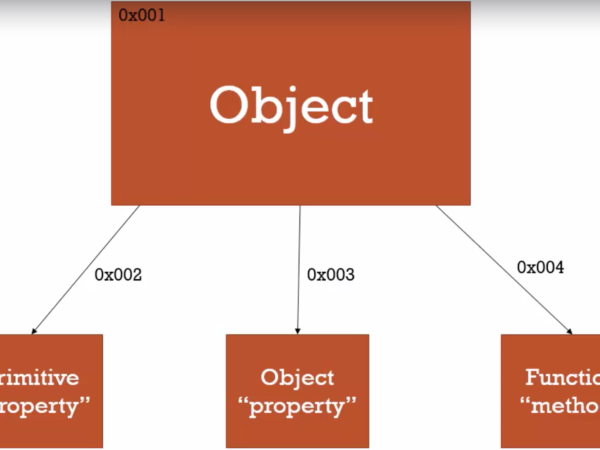
    物件裡面可以包含很多Type 的屬性,本篇主要陳述每個取值、新增、刪除的方式

    取值、新增、刪除的方式可以利用物件. 標記號(點的方式) 呼叫出來!

    https://chiangyuchi.github.io/2019/05/06/2019-05-06/

    取值的方法01

    我就用人體的組成方式,來給大家示範一下

    試試看在物件內的函式呼叫方式

    component.callFamily

    取值的方法02

    呼叫元件內屬性成員

    component.members.kidney

    取值的方法03

    用不同的方式,呼叫元件內屬性成員

    得知一個結論

    當你要呼叫屬性名稱時,屬性名稱可以為 = 數值、字串


    呼叫函式的方法


    新增屬性

    將執行視窗內的物件屬性拉下去,會看到內部的屬性。


    刪除屬性

    刪除componet 裡面的屬性

    1.deposit

    2.後來新增的[$$$]

    delete component.屬性內容;

  • JS – Read the Data in Object讀取物件內屬性的另一個方法

    如題

    僅演示該方法

    讀取物件內屬性

    當你的物件建立完成後, 你可以利用 [ 中括號 ] 去讀取屬性資料!

    執行結果

  • JS Delete the Data in Object刪除物件資料

    延用物件Dynamics 的範例去解說刪除物件內的屬性!

    https://www.educative.io/answers/what-is-the-delete-operator-in-javascript

    加入刪除物件_屬性

    加入delete 語句

    執行結果

  • JS- Object is Empty 空物件/你的物件內屬性常常變動嗎?

    理解物件的概念之後, 這裡示範空物件產生

    空物件的用法, 一般是用在時常變動內部屬性的的物件名稱

    何謂空物件

    格式: Let 物件名稱 = {大括號}Object is Empty

    執行結果

    物件作用域外_新增屬性

    把該物件名稱 Dynamics

    加入其他的屬性

    • dog
    • playStation
    • food

    執行結果


    更改屬性內部值

    執行結果

  • JavaScript 白話物件範例

    本身是工業機電整合 背景的工程師

    喜歡土炮 + 自己架設環境的個性

    又剛剛好是機械系畢業的…

    接下來讓我用機械、機構、機件去解釋甚麼是 “物件”


    資助一下肝肝的工程師吧! A_A ETH/ERC20

    [ 物件-機械類比 ]

    我們組成機械組成單位, 由大到小去闡述: 
    1. 機件: 機構構成之最原始的構件
    2. 單位機構: 尚未達成完全機構功能要求, 卻可以達到預期的運動
    3. 合成機構: 組成大目的性的預期效果之機構
    4. 機器: 改變能量形式, 達到預期有效的功能
    5. 機械: 除了改變能量形式之外, 也可以轉移能量形式變為功
    https://coggle.it/diagram/W6taIQWWyVMDB1yL/t/%E6%A9%9F%E6%A7%8B%E6%A9%9F%E6%A2%B0%E6%A9%9F%E4%BB%B6

    在開始白話解釋物件時, 我們得先知道括號種類


    [括號分別]

    蠻多人到了我這個年紀, 卻不知道括號有哪幾種?

    這裡我幫忙整理幾個…

    https://zh.wikipedia.org/zh-tw/%E6%8B%AC%E5%8F%B7

    • 小括弧(英語:parentheses,又稱圓括弧括弧
    • 中括弧(英語:square brackets,又稱方括弧
      • 半形 []
      • 全形 []
    • 大括弧(英語:curly brackets, 又稱花括弧
      • 半形 {}
      • 全形 {}
    • 六角括弧 〔〕
    • 方頭括弧
      • 實心 【】
      • 空心 〖〗

    [物件-白話]

    let 機器 ={
    
        {
    機件1:"連桿",
    機件2:"滑塊",
    機件3:"基座",
    完全機構1:"減速機",
    
    },
    {
    
    機件1:"軸承",
    機件2:"鉚釘",
    機件3:"螺帽",
    完全機構1:"被動軸承基座",
    完全機構2:"螺桿",
    
    }
    
    }

    [物件內的括號]

    • []中括號: 陣列使用
    • {}大括號: 物件使用
    • ()小括號: 函式參數使用
  • JavaScript-函式宣告Function Declared、函式表達Function Express以及This的觀念。

    本篇章主要是我自己整理出來的 (大多數是爬了各網站、教學文章)

    我把它當作學習筆記, 如果有也侵害著作權

    請留言或是 E-mail: lioajimzen@gmail.com


    Table of Contents
    資料參考來源: 
    1.你不可不知的 JavaScript 二三事#Day19:函數定義 (Function Definition) 的 100 種寫法
    2.MDN_Web
    3.Fooish_Javascript
    4.JS-ES6箭頭函數
    5.Arrow function expressions
    6.六角學院課程

    <函式的概要/Function Outline>

    函式說的白話…

    一連串邏輯判斷+運算式, 將他們寫成一個 “功能容器”, 每次你要用他們的時候, 呼叫他們即可!

    又或者可以將你定義的眾多“屬性“清單包裝在Function 裡面

    <一般函式定義/Function Define>

    一個函式的定義由一系列的函式”關鍵字”組成, 依次為:

    • 用 function 關鍵字來宣告一個函數
    • 我們指定這個函數的名稱 functionName
    • 包圍在括號()中,並由逗號區隔每一個函式參數。
    • 包圍在大括號{}中,用來定義函式內功能的”物件”,而且這些物件已經給予記憶體空間( 通常拿來建立物屬性件使用 )

    函式_結構 Construct Function>>

    function functionName(parameter1, parameter2, ...) {
        statements
        return value;
    }

    可以不包含參數&不回傳/None Return>>

    若你把 return 陳述式刪除, 當這個function 被呼叫之後經處理的結果若沒有 “受眾” , 結果就會顯示 undefined.

    我的文章有寫關於 undefined 就是這篇。

    無Return 結構:

    function functionName() {
    
    //只有陳述式
        statements 
    }
    
    // 輸出結果 : 
    undefined 

    函式範例>>

    函式名稱: squre

    squre函式裡面的算式= number*2 , 運算完成後會把該值 resultVal 作回傳。

    let resultVal;
    let number; 
    
    function square(number) {
              resultVal=number * number;
      return  resultVal
    }
    
    console.log(square(10));
    -----------------------------------
    // 輸出結果
    100

    <函式回傳/Return Satement >

    參考資料:

    MDN_Web_Return

    英文原文: 
    The return statement ends function execution and specifies a value to be returned to the function caller.

    函式回傳:

    當你呼叫這個函式, 此函式的處理功能…. 接手過來處裡你的資料, 處理完之後把這個處理好的值丟到一個內定記憶體區間或式暫存區, 然後再把這個暫存值丟給”呼叫者”, 此時執行到return 陳述式時也代表此函式已經執行完畢!

    function getRectArea(width, height) {
      if (width > 0 && height > 0) {
        return width * height;
      }
      return 0;
    }
    -----------------------------------
    console.log(getRectArea(3, 4));
    // expected output: 12
    
    console.log(getRectArea(-3, 4));
    // expected output: 0
    

    Return的各種表示法>>

    return;
    return true;
    return false;
    return x;
    return x + y / 3;

    <各種函式的寫法/Various Functions Writing>

    1. 宣告式 (Function Declarations)
    2. 匿名表達式 (Function Expressions w/o Function Name)
    3. 具名表達式 (Function Expressions w/ Function Name)
    4. 建構子式 (Function Constructor)
    5. 箭頭函數 (Arrow Function) – ES6 參考資料

    宣告式 (Function Declarations)>>

    • 最標準的寫法。
    • 使用 function 關鍵字作函數的宣告和定義。
    • 具有 Hoisting 提升效果。
    console.log(myFunc);
    console.log(myFunc(3, 6));
    
    function myFunc(a, b) {
        return a + b;
    }
    -----------------------------------
    // 執行結果
    //function myFunc(a, b) {
        return a + b;
    }
    
    //9

    匿名表達式 (Function Expressions without Function Name)>>

    1. 先宣告一個變數,再定義一個函數內容放到該變數裡。
    2. 此方式定義的函數實際上是匿名函數 (a function without a name),將函數定義的主體,存在你定義的變數裡。
    3. 變數名稱不等於函數名稱。
    4. 不具 Hoisting 提升效果。
    console.log(myFunc);
    
    // console.log(myFunc(3, 6)); // TypeError: myFunc is not a function
    
    let myFunc = function (a, b) {
        return a + b;
    };
    
    console.log(myFunc);
    console.log(myFunc(3, 6));
    -----------------------------------
    //執行結果
    //undefined
    //ƒ (a, b) {
        return a + b;
    }
    //9

    具名表達式 (Function Expressions / Function Name)>>

    1. 和「匿名表達式」相似,差別在定義函數內容時,有給予一個函數名稱 (Function name)。
    2. 定義的函數印出來會有函數名稱(不等於變數名稱)。
    3. 無法直接透過該函數名稱呼叫
    4. 不具 Hoisting 提升效果
    console.log(myFunc);
    // console.log(myFunc(3, 6)); // TypeError: myFunc is not a function
    
    var myFunc = function aaa(a, b) {
        return a + b;
    };
    
    console.log(myFunc);
    console.log(myFunc(3, 6));
    // console.log(aaa); // ReferenceError: aaa is not defined
    -----------------------------------
    //執行結果 
    //undefined
    //ƒ aaa(a, b) {
        return a + b;
    }
    //9

    建構子式 (Function Constructor)>>

    說到建構子我們不得不提 new 這個Keyword,因為提到new 我們就要有個概念: 我們正在建立物件!

    1. 先宣告一個變數,再用 JavaScript 內建的函數建構子 Function() 去定義函數內容,放到該變數裡。
    2. 用 Function() 定義的函數自動被給予函數名稱 anonymous但和「具名表達式」一樣,都無法直接透過該函數名稱呼叫
    3. 不具有 Hoisting 提升效果。
    console.log(myFunc);
    // console.log(myFunc(3, 6)); // TypeError: myFunc is not a function
    
    var myFunc = new Function("a", "b", "return a + b");
    console.log(myFunc);
    console.log(myFunc(3, 6));
    -----------------------------------
    //執行結果 // undefined
    // ƒ anonymous(a,b) {
    return a + b
    }
    //9

    JavaScript 最容易考的的題目, 箭頭函式與一般函式的差別!

    箭頭函式 (Arrow Function)>>

    參考資料: MDN_Web_箭頭函式 , 鐵人賽 (Arrow function) 卡斯柏

    An arrow function expression is a compact alternative to a traditional function expression, but is limited and can’t be used in all situations.

    箭頭函式 有著比一般函式表示法更精簡的表示法, 但箭頭函式並非一體適用….

    箭頭函式也有它的極限啊!

    1. Arrow functions don’t have their own bindings to thisarguments or super, and should not be used as methods.
    2. Arrow functions don’t have access to the new.target keyword.
    3. Arrow functions aren’t suitable for callapply and bind methods, which generally rely on establishing a scope.
    4. Arrow functions cannot be used as constructors.
    5. Arrow functions cannot use yield, within its body.
    1. Arrow functions沒有自己的 this、arguments 或 super 可綁定不應該作為 方法 Method
    2. Arrow functions無權造訪 new.target 關鍵字。
    3. Arrow functions不適用於調用、應用和綁定方法,這些方法通常依賴於建立作用域。
    4. Arrow functions不能用在建立建構子。
    5. Arrow functions不能在函式內使用 yield

    Arrow Functions ES5與ES6的不同之處

    底下範例碼參考: Arrow function js_github

    可省略 function 這個關鍵字 !

    FUNCTION(a){} 將改成 (a) =>{}
    //ES5 版本
    var circle = function(r) {
        var PI = 3.14 ;
        return r*r*PI
    }
    console.log(circle(2)) 
    //執行結果  12.56
    
    
    //ES6 版本
    const circle = (r) => {
        const PI = 3.14 ;
        return r*r*PI
    }
    console.log(circle(2)) 
    
    //執行結果  12.56
    

    Arrow Function基本語法結構

    參數1, 參數2, … , 參數N (含Return )

    (參數1, 參數2, …, 參數N) => { 陳述式; }
    
    (參數1, 參數2, …, 參數N) => 表達式;

    陳述式與表達式

    當只有一個參數時, 可去除括號

    (參數1)=> { statements }
    
    //若無參數,就一定要加括號:
    () => { statements }

    Arrow Function進階語法

    // 用大括號將內容括起來,返回一個物件字面值表示法:
    
    params => ({foo: bar})
    
    // 支援其餘參數與預設參數
    
    (param1, param2, ...rest) => { statements }
    (param1 = defaultValue1, param2, …, paramN = defaultValueN) => {
    statements }
    
    // 也支援 parameter list 的解構
    var f = ([a, b] = [1, 2], {x: c} = {x: a + b}) => a + b + c; f(); 
    
    //執行結果 6

    Arrow Function有兩個重要的特性:
    1. 更簡潔的函式寫法
     2. this 變數是全域性的

    //物件內的屬性們
    var elements = [
      'Hydrogen',
      'Helium',
      'Lithium',
      'Beryllium'
    ];
    
    // -----這段函式會輸出[8, 6, 7, 9]這個陣列
    elements.map(function(element) {
      return element.length;
    });
    
    // -----上方一般的函式,可以被改寫成下方的箭頭函式
    elements.map((element) => {
      return element.length;
    }); 
    
    
    //執行結果 [8, 6, 7, 9]
    
    
    // -----如果輸入的參數只有一個,我們可以移除掉外面的括號
    elements.map(element => {
      return element.length;
    }); 
    
    //執行結果 [8, 6, 7, 9]
    
    
    // -----當箭頭函式裡的內容只有'return'的時候,我們刪除return和外面的大括號
    elements.map(element => element.length); 
    
    //執行結果 [8, 6, 7, 9]
    
    
    // -----在這個範例中,因為我們只需要length這個屬性,所以也可以使用解構賦值:
    // -----下方的'length'對應到我們想取得的屬性,而'lengthFooBArX'只是很普通的變數名稱,
    // -----可以被任意修改成你想要的名字
    
    elements.map(({ length: lengthFooBArX }) => lengthFooBArX); 
    
    // [8, 6, 7, 9]
    
    // -----上面解構賦值之後的參數也可以被改寫為下面這樣。但要注意的是,在這個範例中,
    // -----我們不是要指定'length'這個值給一個虛構的屬性,而是這個變數的名稱'length'本身就是
    // -----用來當成我們想從物件上取得的屬性
    
    
    elements.map(({ length }) => length); 
    
    //執行結果 [8, 6, 7, 9]
    

    SetTimeout 箭頭函式結構

    setTimeout(() => {
      // -----100 milliseconds 之後執行
    
    }, 100);

    SetInterval 箭頭函示結構

    setInterval(()=> {
     // -----100 milliseconds 這期間一直處裡。
    
    },100);

    This 與我們分不開>>

    參考資料:

    PjChener_Arrow Function_This, PJCHENder
    那些沒告訴你的小細節this

    解釋 JavaScript 中 this 的值?|ExplainThis

    一般函式內,每個新函式是依據如何被呼叫來定義自己的 this 變數。

    This :一般函式內 結構與功能

    • 建構子時是一個新物件 (這很重要)
    • 在呼叫嚴格模式函數時是 undefined
    • 以物件方法呼叫時則為”基礎物件”

    利用建立物件, 函式帶出數值

    function User() {
        this.name = 'Bob';
    }
    
    function AnotherUser() {
        this.name = 'Hugo';
    }
    
    var user1 = new User();
    var user2 = new AnotherUser();
    
    console.log(user1.name);
    console.log(user2.name);
    
    //顯示結果
    Bob
    Hugo

    This :Arrow Function內 結構功能

    //-----一般函式
    function User() {
    
        this.name = "Bob";
        return this;
    }
    
    console.log(this.name);
    
    //-----箭頭函式
    ()=>{
    this.name ="It is Arrow Functions";
    }
    
    console.log(this.name);
    console.log(typeof this.name);
    
    //顯示結果
    (空物件)
    It is Arrow Functions
    string

    This 提取Arrow Function內部值

    // Arrow function 1
    ()=>{
         this.name ="It is Arrow Functions";
    }
    
    console.log(this.name);
    console.log(typeof this.name);
    
    
    //顯示結果
    //It is Arrow Functions
    //It is Arrow Functions
    //string
    
    • 箭頭函數(Arrow Functions) — this是定義時的對象, 不是在使用的物件。
    • 傳統Function語法 — this是使用、呼叫(call)時的對象。

    用setInterval 將一般函式this 物件p帶出

    function Person() {
      // Person() 建構式將 this 定義為它自己的一個實體
      this.agegrowing = 0;
    
      setInterval(function growingUp() {
        // 在非嚴格模式stric mode下, growUp() 函式把 this 定義為全域物件
        // (因為那是 growingUp()執行的所在),
        // 與 Person() 建構式所定義的 this 有所不同
    
        this.agegrowing++;
      }, 3000);
    }
    
    // 在全域做另一個物件 p
    var p = new Person();
    console.log(p);

    在 ECMAScript 3/5 裡面,this 可透過指派 this 值。

    function Person() {
      var me = this;
                     
      me.age = 0;
    
      setInterval(function growUp() {
        // 這個 callback 參考 `self` 變數,為預期中的物件。
        mee.age++;
      }, 1000);
    }

    透過 bind 函式來綁定 this 變數到指定函式(上面為例,就是 growingUp() 函式)。

    箭頭函式不會擁有自己的 this; 箭頭函式遵循 “常規變量查找規則“。

    當前範圍中搜索不到 this 變量時,他們最終會尋找其作用域。


    Strict Mode 嚴格模式的關係

    參考資料: Arrow function expression

    由於 this 變數具有詞彙上綁定意義,故嚴格模式的宣告對 this 的作用將被忽略。

    Arrow function 沒有自己的this

    // Arrow function 1
    
    ()=>{
         
         this.name ="It is Arrow Functions";
         return this;
    }
    
    console.log(this.name);
    
    
    // Arrow function 2
    var ArrowObject =()=>{
    this.name ="It is ArrowObject Functions";
    
    }
    
    ArrowObject();
    console.log(this.name);
    console.log(typeof this.name);

    This: None Strict Mode

    
    const obj = { // does not create a new scope
      i: 10,
      b: () => console.log(this.i, this),
      c() {
        console.log(this.i, this);
      },
    }
    
    obj.b(); // prints undefined, Window { /* … */ } (or the global object)
    obj.c(); // prints 10, Object { /* … */ }

    This: Strict Mode

    'use strict';
    
    const obj = { // does not create a new scope
      i: 10,
      b: () => console.log(this.i, this),
      c() {
        console.log(this.i, this);
      },
    }
    
    obj.b(); // prints undefined, Window { /* … */ } (or the global object)
    obj.c(); // prints 10, Object { /* … */ }
    

    結語

    有點想不太出來結語要寫甚麼, 光是要弄懂一般函式 vs 箭頭函式 + 蒐集資料就挺累人的